 Melvil
Your files, in the folders they belong in.
Melvil watches your folders, helps you tag what arrives, and moves files where your own rules say, only after you approve the plan. Every move can be undone.
Melvil is in final testing. Nothing here is for sale yet.
How it works
Choose the folders that fill up
Start with the folders that get messy: Downloads, your Desktop, a cloud drive. Melvil lists what is already there and notices every new file that arrives. At this point it only watches; nothing is moved or renamed.
- Folders synced by iCloud, Dropbox or Google Drive work too.
- Hidden files and app bundles are left alone.
- Stop watching a folder at any time; your files stay exactly where they are.
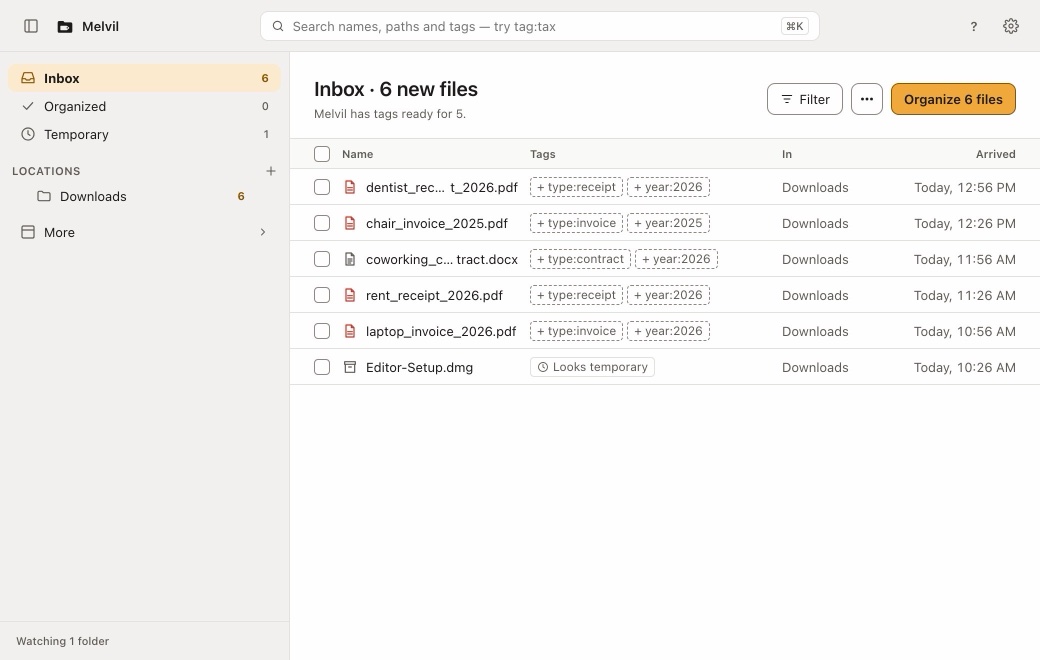
Melvil on a Mac, with example files. Tag what comes in
A tag says what a file is, like type:receipt or year:2026. Melvil suggests tags from the file name, and an AI can suggest more if you connect one. Nothing is tagged until you accept, edit or skip the suggestion.
- When you use an AI, it only sees names, sizes, dates and tags, never what is inside your files.
- Bring your own API key, or connect an AI app you already use on your Mac.
- Your tags show up in Finder too.
Approve the plan
Your tags decide where each file belongs. Melvil puts every move into a single plan and shows it to you first, folder by folder. Files move only after you approve.
- Nothing is ever overwritten: if a name is taken, the file gets (2) at the end.
- You can pause or stop a plan while it is running.
- Changed your mind? Click Undo and every file goes back where it was.


Calm by design
Your files stay yours
Melvil reads names, sizes, dates and tags. File contents never leave your Mac.
Bring your own AI
Use your API key, or connect an AI app such as Claude on your Mac. No AI account with us.
Nothing is lost
Moves are journaled and undoable, never overwrite, and are checked again after a cloud sync.
Questions
Does Melvil upload my files?
No. Your files never leave your Mac. If you ask an AI for suggestions, it receives names, folder paths, sizes, dates and tags, never the contents.
Is Melvil on the Mac App Store?
No. Apps from the App Store run in a sandbox that would block two things Melvil needs: access to your folders and the connection to AI apps on your Mac. You download it from this site instead.